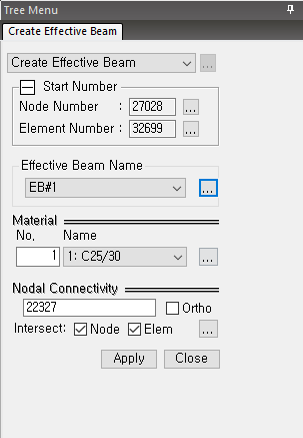
Create Effective Beam
Assigns the Column Capital which is defined in the Define Column Capital function to the column member.
From the Main Menu select Node/Element > Flat/Plate Structure > Effective Beam > Create Effective Beam.
|
1. Effective Beam Name : Select the Effective Beam which was defined in the Define Effective Beam function. You can open the Define Effective Beam dialog box by clicking the
2. Material : Select the Material of Effective Beam. You can open the Properties dialog box by clicking the
3. Nodal Connectivity: Select the two nodes to create Effective Beam
4. Intersect : If there is a Node/Element at the location where the beam to be installed passes, it is decided whether to split.
- Node : If checked, if there is a node on the line of the element to be created, the element is created by dividing it at the node position. It is applied regardless of the element type.
- Element : if checked, when the element to be created and the existing line element intersect each other, a node is automatically created at the intersection and the line element is split.
Note. When setting the Column Strip in the Finite Element Method modeling, you do not need to install the Effective Beam, and you can also set it in the General Beam installation section in Create Element more conveniently. |
 Create Effective Beam